Last updated: November 9, 2026 by the NBI Clearance Online Editorial Team
You book a police clearance appointment online at pnpclearance.ph. Register, pick a police station and a slot, then pay online. Your appointment is confirmed by a reference number. Walk-in payment at the station is not allowed.
This guide covers registration, login and booking step by step. It also explains slots, rescheduling and the rules that cost people their fee.
This is not the official PNP website. NBI Clearance Online is an independent guide. We are not the PNP or any government agency. Apply only at pnpclearance.ph. Never pay anyone who offers to “fix” your clearance.
Police clearance appointment at a glance
| Item | Details |
|---|---|
| Where to book | pnpclearance.ph (National Police Clearance System) |
| Account needed | Yes, one NPCS account per applicant |
| Slots | AM or PM, with the number of slots left per day |
| Proof of booking | Reference number in your Transaction History |
| Payment | Online only, via Landbank ePayment. Over the counter is not allowed. |
| Pay by | At least two banking days before your appointment |
| Fee | ₱150 plus a convenience fee |
On this page:
- Register an account
- Log in to pnpclearance.ph
- Book your appointment
- Slots and schedules
- Change your station or date
- Rules that can cost you the fee
- On your appointment day
- Troubleshooting
- FAQs about police clearance appointments
Register an account
New applicants register first. This is the “police clearance online registration” step.
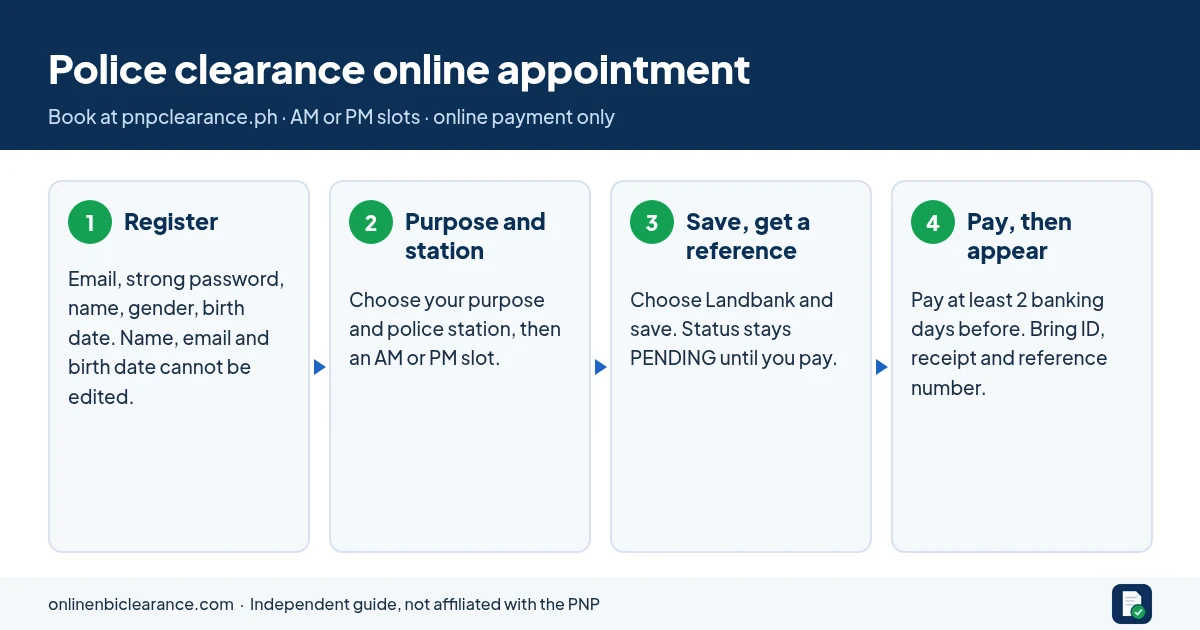
- Open pnpclearance.ph/register.
- Read the four terms pages and tick each box.
- Click Agree to continue.
- Enter your email and a password.
- Add your given name, middle name and surname.
- Pick a qualifier if any, like JR or III.
- Select your gender and birth date.
- Review the summary, then click Confirm & Create Account.
The password needs at least 12 characters. It also needs upper and lower case letters, a number and a symbol.
Check your name, email and birth date twice. The NPCS terms say these cannot be edited once saved. The police station cannot edit them either.
Log in to pnpclearance.ph
Go to pnpclearance.ph/signin. Enter your email and password. Then click Sign In.
Forgot your password? Click Forgot Password on the same page. Use the email you registered with.
Book your appointment
After you sign in, the PNP guide lists these steps (PNP guide):
- Click Edit Profile. Complete your details and save.
- Click Clearance Application.
- Select your purpose.
- Select your preferred police station.
- Pick a date and an AM or PM slot.
- Click the Landbank button, then Next.
- Click Save Appointment.
- Note your reference number.
Your booking now shows in Transaction History. Its status is PENDING until you pay. Next, pay online. See our police clearance fee and payment guide.
The PNP adds one more note. A local police clearance is not needed first.
Slots and schedules
The booking calendar shows AM and PM slots for each day. Each slot shows how many places are left.
In the PNP guide, an AM slot runs 8:00 AM to 12:00 PM. Pick a day with slots still open. Popular stations fill up fast.
Change your station or date
Your booking in Transaction History has three buttons:
| Button | What it does |
|---|---|
| Click here to Pay for more payment option | Opens the Landbank ePayment Portal |
| Change Police Station / Appointment Date | Lets you pick another station or date |
| Print Transaction Details | Prints your booking details |
The guide shows the change button on a booking that is still PENDING. It does not say whether it works after payment.
Rules that can cost you the fee
The NPCS terms are strict (NPCS terms). Know these before you book:
- Unpaid two banking days before? Your booking is cancelled.
- Missed your appointment? Your payment is forfeited.
- Cancelled it yourself? Your payment is also forfeited.
- Typo on the printout? No reprint. You apply and pay again.
On your appointment day
Go to the station you chose. Bring these three things:
- One valid government-issued ID
- Proof of payment (confirmation slip or e-receipt)
- Your reference number
Staff take your photo, signature and fingerprints. Then wait for your name to be called. See the full police clearance requirements and accepted IDs.
Renewing within three years of your last visit? You may not need an appointment at all. See police clearance renewal online.
Troubleshooting
| Problem | What to do |
|---|---|
| No slots at your station | Try another date or a nearby station. |
| Forgot your password | Use Forgot Password on the sign-in page. |
| No confirmation email | Check your spam folder. Some LGU guides say it lands there. |
| Status still PENDING | You have not paid yet, or payment has not posted. |
| Wrong name or birth date | These cannot be edited. Contact the NPCS help desk. |
| Booked the wrong station | Use Change Police Station / Appointment Date. |
Pro tips
- Register on a laptop for fewer form errors.
- Book a weekday morning slot if you can.
- Pay right after you save the booking.
- Screenshot your reference number.
- Arrive early on your appointment date.
Special cases
Some applicants follow a slightly different path. Check yours before you book a slot. Each has its own guide on our site.
- First-time jobseekers: the clearance is free once. See the documents to prepare.
- Past applicants: you may qualify for the renewal option. See how renewal works.
- Abroad or bedridden: you may qualify for a Clearance Certification instead. See our police clearance guide.
FAQs about police clearance appointments
How do I get a police clearance appointment online?
Register at pnpclearance.ph and complete your profile. Click Clearance Application. Pick a purpose, station and slot, then save.
Is the police clearance appointment free?
Booking is free. The clearance costs ₱150 plus a convenience fee.
Can I walk in without an appointment?
The PNP process starts with an online appointment. Payment is online only.
Can I change my appointment date?
There is a Change Police Station / Appointment Date button in Transaction History. The PNP does not say if it works after payment.
What if I miss my appointment?
Your payment is forfeited, per the NPCS terms. Book and pay again.
Where do I find my reference number?
In Transaction History after you save your appointment.
Can I edit my name after registering?
No. The NPCS terms say name, email and birth date cannot be edited.
Do I need a local police clearance first?
No. The PNP says it is not a prerequisite.
Back to the full guide: police clearance online.
Can I choose any police station?
Yes. You set the appointment at your preferred police station. Pick a suitable date in the same step.
How do I pay for my appointment?
Click the pay button after booking. You go to the Landbank ePayment Portal. For GCash, PayMaya, 7-Eleven or Bayad Center, choose Cash Payment.
Sources and how we checked
We checked these PNP sources on November 9, 2026. Fees and rules can change. Spot a change? Please let us know.