Last updated: November 9, 2026 by the NBI Clearance Online Editorial Team
You can pay with GCash in minutes. First, book your slot on the NBI portal. Choose GCash as your payment method. The portal gives you a reference number. It also shows the exact total. Then open GCash. Go to Bills → Government → NBI. Enter the reference number and amount. Confirm, then wait for “PAID” status.
The total is usually ₱155–₱160. That is the ₱130 clearance fee plus the e-payment charge. This guide shows each step. It shows what to type in each field. It also shows how to fix a missing payment.
This is not the official NBI website. NBI Clearance Online is an independent guide. We are not the NBI, GCash or a government agency. Apply only on the official NBI Clearance website (clearance.nbi.gov.ph). Pay only inside your own GCash app, under Bills. The NBI fee never goes to a personal GCash number.
NBI clearance GCash payment at a glance
| Item | Details |
|---|---|
| Where to pay in GCash | Bills → Government → NBI (or search “NBI” in Bills) |
| What you need | Your NBI reference number and the exact total from the portal |
| Total to pay | About ₱155–₱160: ₱130 fee plus an e-payment charge of about ₱25–₱30 |
| GCash account type | Basic accounts can use Pay Bills, so full verification is not required (GCash Help Center) |
| Posting time | Shown at the top of the GCash bills page; Globe’s GCash guide says NBI payments post within 24 hours |
| Proof of payment | GCash receipt plus your NBI reference number |
| After “PAID” | A 15-day grace period to visit your branch, per the NBI’s how-to-apply guide |
On this page:
- What you need before you pay
- How to pay, step by step
- What to enter in GCash
- How much you pay
- How long until it shows PAID
- Problems and fixes
- FAQs
What you need before you pay
Get these ready before you open GCash. It takes two minutes. It also saves you from a failed payment.
- Your NBI reference number. The portal makes it after you book and choose GCash.
- The exact total. It appears next to your reference number. Do not round it.
- Enough GCash balance. Cash in first if your wallet is short.
- Room in your monthly limit. Basic accounts have a ₱5,000 monthly outgoing limit (GCash limits).
- An updated GCash app. Old versions can fail on government billers.
No reference number yet? Start with our NBI online appointment guide. You book the branch and slot there first.
How to pay NBI clearance via GCash, step by step
The payment happens in two places. The NBI portal gives you the reference number. The GCash app sends the money. Then you check the portal for “PAID”.
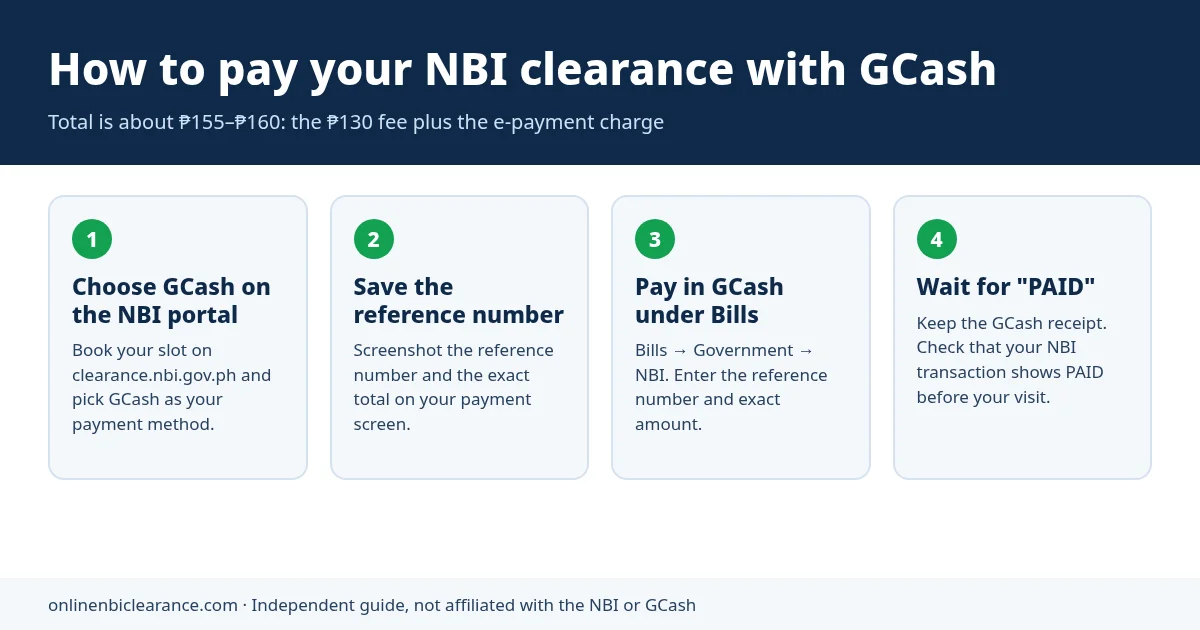
Step 1: Book your slot on the NBI portal
Log in at clearance.nbi.gov.ph. Complete your profile and click “Apply for Clearance”. Pick your branch, date and AM or PM slot. Check the NBI clearance requirements so your ID matches.
Step 2: Choose GCash as your payment method
The portal asks how you will pay. Select GCash. Read any instructions in the pop-up. New NBI GCash steps will appear there first.
Step 3: Save your reference number and total
The system now shows your reference number. It also shows the amount to pay. Screenshot both right away. The NBI calls it your “gate pass” at the branch.
Step 4: Open GCash and go to Bills
Log in to GCash and tap Bills. Choose Government, then NBI. You can also type “NBI” in the search bar. Make sure you picked NBI, not another agency.
Step 5: Enter the details and confirm
Type the reference number and exact amount. Add your mobile number and email if asked. Tap Next and review the summary. Confirm the payment when everything matches.
Step 6: Keep the receipt and check for PAID
GCash sends a confirmation to your inbox and email (GCash: How to pay bills). Screenshot the receipt. Then log in and open your portal transactions. Go to the branch once your status says “PAID”.
Your portal may show a QR code. Some applicants see a QR code on the payment screen. If yours does, you can scan it in GCash instead. Follow what your own payment screen says.
What to enter in GCash
Most failed payments start with one wrong field. Copy each value from the portal. Do not type it from memory.
| Field | What to enter | Mistake to avoid |
|---|---|---|
| Amount | The exact total on your NBI payment screen | Entering only ₱130 without the e-payment charge |
| Reference number | Your NBI reference number, every character | Typing the NBI ID number from an old clearance |
| Mobile number | Your own active number | Someone else’s number, so the receipt goes to them |
| Your own email, if GCash asks | A typo, so you miss the email receipt |
The NBI ID number and the reference number are different. The NBI ID number is printed on an old clearance. It is used for online renewal. The reference number is new for each application.
How much you pay with GCash
GCash does not change the NBI fee. You pay the total on the portal. That is the ₱130 fee plus the e-payment charge. Read the full breakdown in our NBI clearance fee guide.
| Application | What you pay |
|---|---|
| New application or branch renewal | About ₱155–₱160 |
| Online renewal with delivery | Fee + e-payment charge + delivery fee shown at checkout |
| First-time jobseeker (RA 11261) | Free, through the NBI’s separate jobseeker application |
| HIT or quality control | No extra fee |
First job? You may not need to pay at all. See the free NBI clearance for first-time jobseekers. Renewing? You can pay an online NBI clearance renewal with GCash too.
How long until it shows PAID?
Often it is quick, but not always. GCash says not all billers post in real time. Posting can take a few hours or days. Globe’s guide says NBI payments post within 24 hours.
- Pay at least a day before your appointment.
- Do not pay again while you wait.
- Log out and back in to refresh your status.
- Still pending after the posting period? Use the fixes below.
Once you are “PAID”, you get a 15-day grace period. You can usually visit your branch within it.
GCash NBI payment problems and fixes
Most problems are posting delays or typing errors. Check your wallet first. Then check your GCash transaction history. Only then contact anyone.
| Problem | What to do |
|---|---|
| Money left your wallet, portal still says pending | Wait for the posting period. Then open the payment in Transactions, tap Get Help and choose “My payment hasn’t been posted.” |
| Wallet not deducted | The payment did not go through. You can try again. |
| NBI biller is greyed out | It is under maintenance. Try again later or use another channel. |
| “You may be repeating this transaction” | Stop retrying. Wait 1–2 hours, then check before paying again. |
| Wrong reference number or amount | Contact the NBI. Then use Get Help → “I entered the wrong details” in GCash. |
| Charged twice | Contact the NBI with both receipts. Then report it through Get Help in GCash. |
| Transaction limit reached | Your GCash limit resets monthly. Use another channel if your slot is soon. |
Deducted but not reflected
This is the most common issue. GCash says a deducted wallet means the payment is processing. Wait for the posting period shown in GCash. If GCash later confirms it failed, the amount is refunded. If not, contact the biller.
Wrong reference number
The payment will not reach your application. GCash says refunds for wrong details are not guaranteed. They depend on the biller’s approval. Report it in GCash and call the NBI quickly.
Who to contact at the NBI
NBI clearance inquiries: (02) 8524-1277 or 0939 150 2880. Email: [email protected]. These are listed on the NBI contact page. Have your reference number and GCash receipt ready.
Can you get a refund?
It depends on what happened. A failed payment is refunded by GCash. GCash says to expect it within 24–48 hours. A successful payment cannot be refunded by GCash. For wrong details or double payments, the NBI decides. Check the portal or ask the NBI first. Do not pay again blindly.
Paying for a family member
You can pay for someone else from your own GCash. Ask them for their reference number and exact total. Enter those in Bills → Government → NBI. Then send them the receipt. They bring it to the branch with their own IDs.
Pro tips for a smooth GCash payment
- Pay right after you get your reference number.
- Copy and paste the reference number. Never retype it.
- Screenshot the portal total and the GCash receipt.
- Pay a day before your slot, not on the day.
- Never pay twice in a panic. Check Transactions first.
- Save NBI as a favorite biller in GCash for next time.
Avoid GCash payment scams
- Pay only under Bills. Never use Send Money for the NBI fee.
- Ignore Facebook or text offers to “process” your payment.
- Never share your MPIN or one-time code with anyone.
- Log in only at clearance.nbi.gov.ph.
- Anyone asking far more than ₱160 is not official.
Other ways to pay
GCash is not your only choice. The NBI also lists Maya and 7-Eleven. Bayad Center and online banking work too. Your steps on the portal stay the same. Compare them in our NBI clearance price and payment options guide.
FAQs about NBI clearance GCash payment
Can I pay my NBI clearance with GCash?
Yes. GCash is a payment option on the official NBI portal. Choose it and get your reference number. Then pay under Bills → Government → NBI.
How much is the NBI clearance via GCash?
About ₱155–₱160 in total. That is the ₱130 fee plus a ₱25–₱30 e-payment charge. Pay the exact amount on your screen.
Do I need a fully verified GCash account?
No. GCash says Basic accounts can use Pay Bills. Your balance must still cover the total.
Where do I find NBI in GCash?
Tap Bills, then Government, then NBI. You can also search “NBI” in Bills.
How long is my reference number valid?
We could not confirm an official time limit. Check the NBI portal for any deadline. Pay soon after you get the number to be safe.
I paid but my status is still pending. What now?
Wait for the posting period. Check that GCash deducted your wallet. Then use Get Help in GCash. Contact NBI clearance inquiries too. Do not pay again.
Can I pay with GCash for someone else?
Yes. Use their reference number and exact total. Then send them the receipt.
Can I pay with Maya instead of GCash?
Yes. The NBI also lists Maya, 7-Eleven, Bayad Center and online banking. Pick the channel when you book.
Do I pay again if I miss my slot?
Not right away. The NBI gives a 15-day grace period after “PAID” status. Ask the NBI before paying for a new slot.
Who do I contact at the NBI about a payment?
Call (02) 8524-1277 or 0939 150 2880. You can also email [email protected]. Have your reference number and GCash receipt ready.
Spotted something that changed?
GCash menus and NBI payment rules can change. Does your screen look different? Please let us know. Every guide follows our editorial policy. We used these sources. They are the NBI’s how-to-apply guide, the NBI contact page, the GCash Help Center and the official portal, clearance.nbi.gov.ph.