Last updated: November 9, 2026 by the NBI Clearance Online Editorial Team
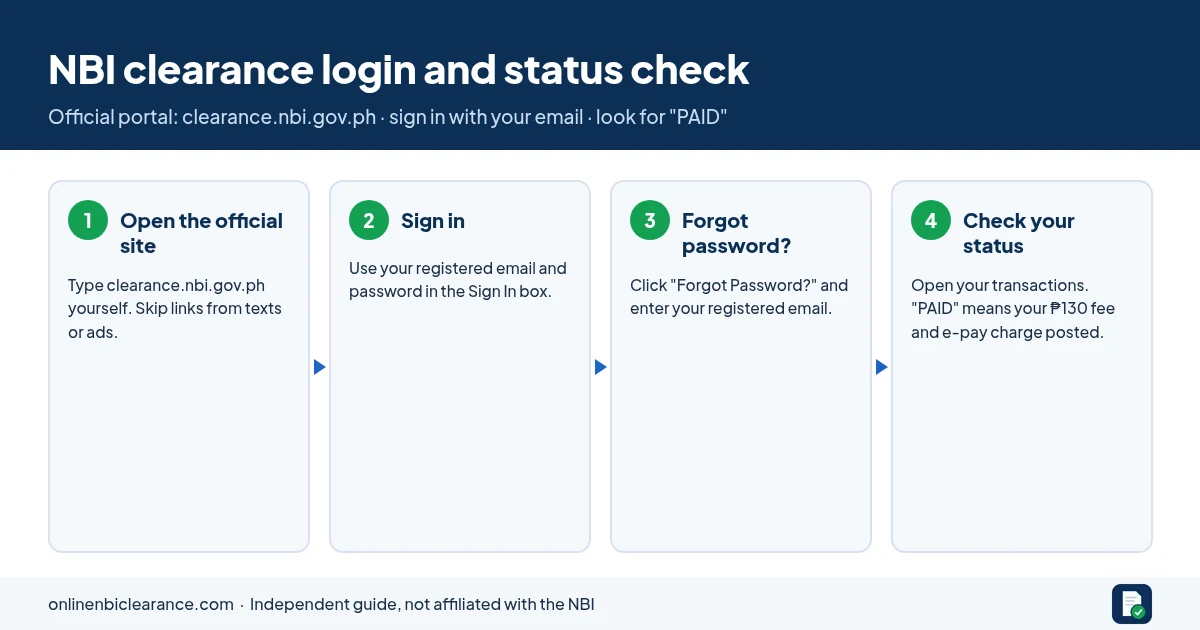
The NBI clearance login is on one site only. That site is clearance.nbi.gov.ph. Sign in with your registered email and password. The Sign In box sits at the top right. Forgot your password? Click “Forgot Password?” under the box.
After you sign in, check your transactions. “PAID” means your payment posted. Then you can visit your branch. This guide covers login, OTP, password resets and status checks.
This is not the official NBI website. NBI Clearance Online is an independent guide. We cannot see or reset your account. Log in only at clearance.nbi.gov.ph. Never share your password or OTP with anyone.
NBI clearance login at a glance
| Item | Details |
|---|---|
| Official login site | clearance.nbi.gov.ph (the Sign In box, top right) |
| What you sign in with | Your registered email and password |
| Forgot password | Click “Forgot Password?” and enter your email address |
| OTP | Sent to verify your registration, so use an active mobile number and email |
| Where to see your status | Your transaction page on the portal |
| Status you want | “PAID”, then a 15-day grace period to visit your branch |
| Clearance inquiries | (02) 8524-1277, 0939 150 2880, [email protected] |
On this page:
- How to log in
- Forgot your password
- OTP problems
- How to check your status
- Delivery tracking
- Problems and fixes
- FAQs
How to log in to your NBI clearance account
You need an account first. New here? Register on the same page. The NBI sends an OTP to verify it. Our NBI online appointment guide shows the full sign-up.
Step 1: Open the official NBI clearance website
Type clearance.nbi.gov.ph in your browser. Do not use links from texts or ads. Bookmark the page once it loads. Close the pop-up notices to see the form.
Step 2: Find the Sign In box
Look at the top right of the homepage. You will see Email and Password fields. There is a “SIGN IN” button beside them.
Step 3: Enter your email and password
Use the email you registered with. A newer email will not work. Type your password carefully. Then click “SIGN IN”.
Step 4: Enter the OTP if asked
The portal may send a one-time password. Enter it on the screen. Use it right away. Never give it to anyone.
Step 5: Go to your profile or transactions
You are now in your account. Update your profile or apply for clearance. You can also check your transactions there.
Forgot your NBI clearance password?
You can reset it from the homepage. You only need your registered email.
- Click “Forgot Password?” under the Sign In box.
- A “Forgot Password” box opens. Type your email address.
- Click Submit.
- Check your inbox and spam folder for the NBI email.
- Follow its steps, then sign in again.
Lost access to that email? Recover it with your email provider first. Still stuck? Contact NBI clearance inquiries. Email [email protected] or call (02) 8524-1277 (NBI contact page).
Do not pay anyone to “unlock” your account. Fixers cannot reset NBI passwords. Use only the “Forgot Password?” link or the official NBI contacts.
NBI clearance OTP problems
The NBI uses an OTP to verify your registration. That is why your number and email must be active (NBI how-to-apply guide). Most OTP problems are quick to fix.
- Check your spam folder. The code can land there.
- Check your signal. Weak signal delays text messages.
- Wait a few minutes. Then request a new code.
- Use the newest code only. Older codes may no longer work.
- Check your details. One wrong digit sends the code elsewhere.
How to check your NBI clearance status
Log in at clearance.nbi.gov.ph. Open your transaction page. Your application status shows there. The NBI says to prepare for the branch once it says “PAID” (NBI).
| What you see | What it means | What to do |
|---|---|---|
| “PAID” | Your payment has posted | Visit your branch within the 15-day grace period |
| Not yet “PAID” | Your payment has not posted yet | Keep your receipt and wait; see our GCash payment guide |
| HIT at the branch | Your name matched a record | Return on the date given; read NBI clearance HIT |
| “For Quality Control” | Your HIT needs an interview | Follow the branch instructions |
Lost your reference number? Log in and open your transaction again. It is still there.
Status check vs NBI clearance verification
These are two different things. A status check is for your own application. Verification checks if a printed clearance is real. Employers use it. See our NBI clearance verification guide for that.
NBI clearance delivery tracking
Did you renew online with delivery? Then your clearance comes by courier. We found no public tracking page on nbi.gov.ph. Check the NBI portal for updates. You can also call the delivery lines below.
| Contact | Numbers |
|---|---|
| Clearance Delivery | +63 949 631 0713, +63 920 412 9999 |
| Delivery Helpdesk | +63 961 731 9404, +63 960 891 5222, +63 960 828 7044 |
| Mailed Clearance | 0915 689 3113, 0920 122 3327, [email protected] |
Delivery time depends on your area. Read our NBI clearance renewal guide for timelines.
NBI login problems and fixes
| Problem | Quick fix |
|---|---|
| Wrong email or password | Check for typos and Caps Lock, or use “Forgot Password?” |
| OTP not received | Check spam and signal, wait, then request a new code |
| No reset email | Check spam, then contact [email protected] |
| Site will not load | Type clearance.nbi.gov.ph yourself, or try another browser |
| Pop-ups cover the form | Read them, then click “I AGREE” or “CLOSE” |
| Your details changed | The NBI advisory says to register online again |
| Paid but not “PAID” | Wait for posting, keep the receipt, then contact NBI |
The portal advisory is clear on corrections. Even a one-letter fix needs a new online registration. Bring two valid government IDs to the branch. Check our NBI clearance requirements first.
Pro tips for a smooth NBI login
- Use one email for all NBI transactions.
- Save your password in a safe place.
- Screenshot your reference number every time.
- Log in on a laptop if your phone struggles.
- Never log in through a link someone sends you.
Which NBI portal should you use?
The NBI runs more than one online channel. Each one serves a different group. Use the right one to avoid login errors.
| Website or app | Who should use it |
|---|---|
| clearance.nbi.gov.ph | Most applicants: new applications, online renewal, status and booking. |
| firsttimejobseekers.nbi.gov.ph | First-time jobseekers claiming the free clearance under RA 11261. |
| eGovPH Super App (NBI eClearance) | Verified eGovPH users renewing an existing clearance. |
How to spot a fake NBI login page
- Check that the address ends in .gov.ph.
- Type clearance.nbi.gov.ph yourself. Avoid links in ads or chats.
- Never share your password or OTP with anyone.
- Our site is a guide. We never ask you to log in here.
Still stuck after trying the fixes above? The NBI lists landline (02) 8524-1277, mobile 0939 150 2880, email [email protected]. Source: NBI contact page.
FAQs about NBI clearance login and status
What is the official NBI clearance login site?
It is clearance.nbi.gov.ph. The Sign In box is at the top right. Do not trust look-alike addresses.
Can I log in to the NBI clearance site on my phone?
Yes, the site opens in a phone browser. If it lags, try a laptop. You can also try another browser.
How do I check my NBI clearance status online?
Log in and open your transaction page. Look for “PAID”. Then go to your branch.
Is the NBI status check the same as verification?
No. Status is about your own application. Verification checks if a clearance is genuine.
What if I forgot the email I registered with?
Search your inboxes for NBI emails. Check old payment receipts too. Then contact NBI clearance inquiries.
Can I renew without logging in to the portal?
Some people can renew in the eGovPH app. Our renewal guide explains who qualifies.
I am a first-time jobseeker. Where do I log in?
The NBI points first-time jobseekers to a dedicated portal. Its button is on the portal homepage. Read our first-time jobseeker guide.
Can I log in with the eGovPH app?
Verified eGovPH users can open NBI eClearance in the app. It shows your existing clearance for renewal. New applicants still use clearance.nbi.gov.ph.
What if my name is wrong in my account?
Register online again with the correct details. The NBI says any correction needs a new registration. This applies even to one letter.
Sources and how we checked
We opened the official portal on November 9, 2026. We checked the Sign In box and “Forgot Password?” form. We also read the portal advisory. Login screens can change. Does yours look different? Please let us know.
- NBI: How to Apply for NBI Clearance
- NBI: Contact Information
- Official NBI Clearance website (Sign In, Forgot Password, advisory)
- Our editorial policy